Web News: WooCommerce 3.2 Updates

At Moocow, we pride ourselves on having the most up to date knowledge on the hottest web trends, software and programs. With technology and techniques developing daily, we’ll make sure you’re getting the latest info on what’s happening in the world of web.


Many of our clients manage their online business through platforms such as WooCommerce. WooCommerce is an e-commerce plugin, its intentional use is for either small or large businesses to create an online selling platform using WordPress. This Autumn, WooCommerce have been updating their latest version, offering a bunch of improved applications and extensions. Below is a list of current optimisations that have been finalised:


  • Improvements for coupon options and management of extensions

  • You can now apply discounts to coupon orders without having to do it manually

  • Alerts are sent for new updates on WooCommerce and other extensions giving you the option to download immediately if using outdated versions

  • An easier “unified shortcode” when itemising various products on your webpages

  • A new filter enabling you to simply browse your extensions and identify which are ‘Active’ on the webpage 


Although the changes may appear small, they offer some nifty adjustments to help run the platform simply, creating smoother running for both developers and clients.


Web News: Twitter Increases Character Limit For Tweets

At Moocow, we pride ourselves on having the most up to date knowledge on the hottest tech trends and web news. With technology and techniques developing daily, Moocow are continuously working hard to help find new ways to develop your business.

It wasn’t long ago that we were raving about the Tweetstorm feature in one of our recent web news blogs. Despite Twitter leading the way as the most successful social media platform for businesses, we debated it’s one major downfall – the length of posts you are allowed to Tweet. For some users, this has helped simplify things when creating a post – allowing them to Tweet info that is direct and uncomplicated. However for many – the 140 character limit can be particularly frustrating, especially when you feel you’ve got a lot more to say. Jogging your memory at all? Well, Twitter has just released today that you can now send tweets that are 280 characters long, doubling the limit from before.

This feature will be available to almost everyone on Twitter, however tweets in Korean, Chinese or Japanese would not be included as the developers felt the structure of these languages already enabled them to put much more information in one tweet. The Twitter team has already experienced a huge surge in users rushing to take advantage of the new feature this morning with everyone getting excited. Their analytics team have stated that those with tweets posted with a larger number of characters were receiving much higher interest, likes and engagements.

Michael Nagle/Bloomberg via Getty Images

10 Of The Best Tech and Web Design Email Newsletters To Subscribe To

At Moocow, we pride ourselves on having the most up to date knowledge on the hottest tech trends and web news. With our latest research, we’ve compiled a top ten list of what we believe are some of the best web design email newsletters to subscribe to, packed full of helpful tips, tutorials and freebies to get you going in all areas of design.

If you’re looking to get your hands on the hottest web development, coding and design news, subscribing to these email newsletters will leave your inbox filled with the best info, resources and design inspiration from masters in the world of tech.

The Download – A newsletter that appears daily in your inbox curated by MIT’s Technology Review. It’s one of several of MIT’s technology review and aims to offer a complete low down on what’s going on in the tech world.

Recode Daily – A round-up of the best news and trends relating to both tech and business. Signing up grants you access to articles and podcasts on what’s trending in areas including Commerce, Social media, Enterprise and Mobile and info on any upcoming events.

The Webdesigner Newsletter – Created specifically for developers and designers, the Webdesigner targets those wanting access to handy resources and plenty of free stuff. Top subjects include UI, HTML, Typography and help with design inspiration.

Hacking UI – An extremely useful product design and front-end development newsletter, dishing out articles, podcasts & master classes. Covering everything from VR, UX Photoshop and general web design.

Web Tools Weekly – If you’re searching for the latest info on tools for front-end developers, the Web Tools newsletter will be just the thing for you. This weekly newsletter offers tips and tutorials, and an inside guide to the latest apps, scripts and plug-ins.

Sidebar – Designer, developer and entrepreneur Sacha Greif’s daily newsletter showcasing her 5 favourite design articles, interviews and resources of the day. Helpful info on UX design, image freebies, CSS help, design program guides and general news in the world of web.

wpMail – A free, weekly WordPress Newsletter for general WordPress users with a handful of WordPress news and articles featuring SEO tips, themes and plug-ins.

MasterWP – Another weekly newsletter from WordPress, this time aimed at professionals who are proficient in all things WP. Every Wednesday get your hands on a variety of artciles, apps, tools and extras that will make life easier for WordPress pros.

DevTips – A collection of weekly developer tips from front-end developer and expert Umar Hansa. Those who sign up will get a developer tutorial or tip sent to you as a gif. Great for info on CSS, JavaScript, network issues and UI.

Frontend Focus – A once a week bundle of the best front-end news stories, tips and tutorials. From HTML, CSS, WebGL, Canvas, browser tech and more, the newsletter also includes the latest job vacancies in the tech industry if you’re currently looking for a career or new job as a developer.


Auto-Create Code Snippets with Ease Using WordPress Hasty

At Moocow, we pride ourselves on having the most up to date knowledge on the latest web news. With technology and techniques developing daily, Moocow are continuously working hard to help find new ways to develop your business.

When it comes to WordPress, working with WP code snippets often proves tricky for developers and designers. Having to edit and add code from different programs using copy-paste actions is an infuriating task, whether it’s custom taxonomies you’re using or WP_Query loops.

WordPress have obviously decided to take these issues on board and have created an app that answers all your code snippet prayers. The WP Hasty app is the easiest way to create top-quality custom code for your WordPress sites. It’s super fast, so it saves both time and effort when jumping between projects, and not only that – it’s free.

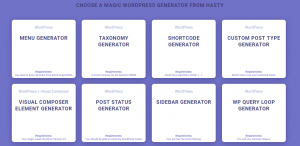
The app allows you to create code snippets by simply clicking a category button, offering 9 different code generators for frequently used WP snippets. More are set to be released this November.


All adhere to the correct WP themes and plug-ins coding standards, literally allowing you to just copy and paste the code snippets. The generator interface loads onto a new tab, detailing custom settings for whichever area chosen. Your code output will remain on the page you are already on inside a small text editor interface, so the only work you have to do is copy and paste your codes into the chosen theme for your project.


Web Trends: Using Photographic Special Effects

At MooCow, we pride ourselves on having the most up to date knowledge on the hottest web trends. With technology and techniques developing daily, take a look at what 2018 has in store for the world of web design.

GIFS – annoying or great fun? Most of us are divided on this opinion. However, when used correctly GIFS and other animated photographic techniques can be the perfect way to give your website that wow factor. Cinemagraphs work by combining Hi-Res images with a video that loops a selected part of the image, making it animated. This makes an already eye-popping image even more magical, allowing viewers to see photographs come to life before their very eyes. These short snippets of animation are becoming increasingly popular, with many social media sites adding tools to create your own online, an example being Instagram’s Boomerang which allows you to upload and create a short repeated video clip. Marketing trends for 2018 are set to become more and more visual, with businesses wanting to create backdrops to their sites that entice and excite their audiences. Working hand in hand with the use of parallaxes and animated backgrounds, using cinemagraphs with your website could be just the thing to get your new website of the ground.

5727263344_7cbca6d91f_o

Web News: Tweetstorm Feature Hidden on Twitter Android App

Twitter continuously leads the way as a successful social media platform for businesses, but let’s face it – the one major difference between Twitter and other social media sites such as Facebook, is the length of posts you are allowed to Tweet. For some users, this has helped simplify things when creating a post – allowing them to Tweet info that is direct and uncomplicated. However for many – the 140 character limit can be particularly frustrating, especially when you feel you’ve got a lot more to say.

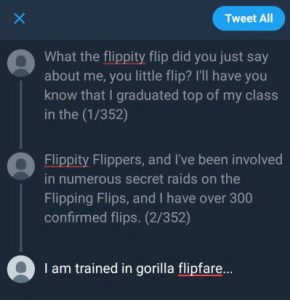
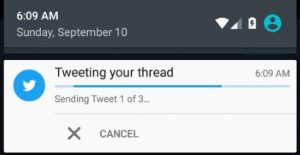
Recently it has come to light that hidden within Twitter’s Android app is a “Tweetstorm” feature, allowing users to post what can be seen as a thread of tweets continuing on from a discussion or theme. To do this you simply need to post a tweet, and then continue to post replies to keep the thread going.

The screenshots depicting the “Tweetstorm” were posted by a Twitter user under the false name of Devesh Logendran. After being tweeted by The Next Web’s Social Media Director Matt Navarra, the images have since gone viral and are now trending across major tech news sites. The pictures show the posts split up as individual tweets posted as a thread, with the end showing a longer “tweet count”.


So, should Twitter make plans to scrap their current character limit? Does this current restriction put off those new to Twitter? Or do shorter posts help businesses get more direct messages across to their audiences?

Despite being largely talked about across the world of web, Twitter has refused to make a statement on the finding of the feature. So keep your eyes peeled and hopefully in the near future the adjustment will be made usuable on all of Twitter’s mobile platforms. In the meantime, users will have to look to Storm It on Android and iOS to create Tweetstorms of their own.

Overcoming the Challenges Women Face Whilst Working in Technology

Being a women that works in tech is a constant challenge. I’ve faced plenty of obstacles that have been thrown in my direction, just to work in an industry that is predominantly male-orientated. But why should this be so? With statistics showing women are outperforming men in nearly all sectors in the tech field, why should we be constantly put off from studying in an area we undoubtedly excel in? Deloitte recently released figures stating that as many as 70 per cent of women in the UK with a Science,Technology, Engineering or Mathematics (STEM) qualification aren’t currently working in their chosen industry. This is a reality that just should not be so, and so much of the hard work young women have put into their employment or education is being wasted.     

Unlike many, I’ve been determined enough to not let these predictions get in my way, and have spent the last few years taking on the tech industry myself. At 22, I started my degree. Beginning later than most, I’d spent some time debating the type of career I was interested in. Having studied in English, Chemistry, Biology and Art and Design, I opted for a BA Hons Degree in Creative Media Practice & Journalism. Despite a lot of thought going into my degree choice, throughout the entire process I was constantly being told I would not make it in this industry, that my degree was pointless and I would be lost in a sea of unemployed graduates once finished with my finals. Yet at age 26, I’ve been lucky enough to pull through with an upper second class degree, a longstanding portfolio and jobs in my chosen industry before officially graduating.

With men accounting for such a large percentage of jobs in the tech industry, it can be tricky competing for the same role, despite some of the most famous leaders in technology being female. The list of women who have braved the odds to succeed within technology is lengthy. From Ada Lovelace – a mathematician regarded by some as the first ever computer programmer, to Mary Lou Jepsen – NASA fellow, founder of Pixel Oi and Director of Engineering at Facebook Occulus VR, to Virginia Rometty – the CEO of IBM who started work as an engineer aged just 24, and was recently voted the most powerful woman in business by Fortune Magazine.

Yet despite such success, women seem to be constantly pushed into being put off from obtaining jobs within the technology industry. Statistically the proportion of girls opting to continue subjects such as Mathematics, Science or Engineering into A Level or Degree Level is far less than boys, with only 7% of girls choosing to study A Levels in these subject areas within the last few years. Shedding light on such issues will hopefully allow changes to be made for the future, and as a woman currently working in tech, I’ve pieced together a few tips for those potentially considering going into a career in the technology industry, in the hope that you can overcome some of the challenges many will face.


Don’t be put off choosing scientific subjects at college

If you’re like me, you probably spent most of your childhood with your nose buried deep inside a book, concocting science experiments, blowing up bicarbonate volcanoes at the bottom of the garden, or getting excited over your parents getting you a new geometry set. To some, we may appear the most boring people on earth, but in reality many will grow up to work in some of the most powerful positions on the planet. No matter what job you’re dreaming of, whether it’s as a scientist, engineer, designer or developer – don’t let anyone stop you from studying exactly what you want to do. Sex or gender should not limit your choice of career path. If you studied in a different subject previously and are wanting to enter into a new choice of career, it’s never too late. And when certain education routes get a bit pricey, there are many different ways to gain qualifications, including ones that don’t come with a price tag. As well as bursaries, scholarships and Arts Council Funding, many companies will actually offer to train people for free. On top of this there are boot camps and hundreds of online training programs and resources that can help you transition into a tech role if you don’t have the qualifications needed for a specific job. And if you’re looking to learn code, there are thousands of sites that can help you, Codecademy, HackerRank & edX are to name a few.


Stand your ground when it comes to your career path 

Time and time again I have met with interviewers who comment on my age, refer to me as being too young to possibly have any ‘real’ industry knowledge or seem to be completely bewildered by the idea of a young women applying for a role within the tech industry. It can be hard to overcome an interview situation where you’re being made to feel about 2ft tall, just for not fitting into a stereotype, particularly if you quite clearly have skills that are being overlooked. To overcome this, confidence is key. Now it’s all very well saying this, but if you’re as anxious a person as I am, this can be quite the challenge. First rule is to have a good perception of your own skills, the abilities you have and what you can achieve. If you don’t feel confident in your own abilities, it can be hard for others to feel the same. Prove you are the right person for the role, use active language that shows off your talents instead of being passive, state direct plans you have and show just how much you can benefit their company. Be bold and never feel intimidated, no matter how terrifying the interviewer may appear.


Have a plan and find mentorship

I worked constantly all through my degree building up my portfolio. A good deal of free time I had was spent either applying for internships or gaining work experience. Sure, having to work for free sometimes can feel like a real pain, but if a company is offering you valuable experience, don’t turn it down – in the long run it can really pay off and looks great on your CV. Always take time to refine your skills, practice really does make perfect. Finding mentorship within a working role can also be really beneficial, so be sure to place yourself in an environment where you can be surrounded by professionals in your chosen field who are as passionate about your goals as you are. Most importantly, never give up on what it is you want to achieve. It can be hard seeing friends or colleagues achieving their goals faster than you or at different rates, but the job you’ve been waiting for could be just around the corner. Hard work always pays off, and whether it takes you 1 year, 5 years or even 10 years to reach the job you’ve always wanted, it’s always worth the wait.


Amy Louise  – Web Editor, Tech Writer and Analytics Queen

                       @BumpCx/MoocowMedia

                        Freelancer @ Metro/Brighton

                        Source/NME/Guardian

Tech News: Google’s Getting a New Homepage for the First Time in 20 Years

At Moocow, we pride ourselves on having the most up to date knowledge on the hottest tech trends and web news. With technology and techniques developing daily, we’ll make sure you’re getting the latest info on what’s happening in the world of web.

Google’s famous search engine was launched in 1997, and since that day its iconic homepage has yet to change – minus a few animation tweaks to the logo when a celebratory holiday pops up. Despite boldly clinging to its design for 20 years, Google has finally announced that it will be giving its home page a brand new makeover, with the launch of a personalised news feed added to the browser version of the original Google search bar. 20 years is a long time to wait to make such a change, which makes this pretty big news for the company. So why now? You might be asking. The change comes after a massive surge in the amount of AI being used to predict search queries which is fast becoming a replacement for traditional search engines, a trend that is expected to continue to rise considerably in the future. According to recent statistics released, 99.9% of Google’s revenue is from the use of “search and video advertising”, and with search engines becoming a dying format, Google needs to up its game to stay ahead of its competitors. Google’s plan is to develop a news feed style homepage similar to how Facebook and other sites operate, with predictions of searches, latest news and what’s trending. So if you’re a Google user, be sure to keep your eyes peeled for some significant upcoming changes.

Web Trends: The Rise of M-Commerce

At Moocow, we pride ourselves on having the most up to date knowledge on the hottest web and marketing trends. With technology and techniques developing daily, Moocow are continuously working hard to help find new ways to market your business.

When it comes to tech, bigger isn’t always better, and with new developments constantly progressing for smaller devices, mobile is once again leading the way for businesses – making it even more important to make sure your company website is up to date with mobile first. With most of us spending 90% of our time glued to our phone, it’s no wonder more and more transactions are happening from mobile devices. Whether it’s giving Amazon a browse, or shopping for clothes online in time for Spring, more and more people are turning to smartphones to make the transactions they need.

Our previous blogs have mentioned that in the last couple of years, there’s been a giant leap in what we call ‘internet browsing behaviour’, with thousands of people swapping from desktop to mobile technology. Well the same is happening for e-commerce businesses, with m-commerce trends leading the way for changes to how sales transactions are being made. Statistics predict around 50% of business transactions will be mobile in the next 2-3 years. And with options like single-click payments with PayPal One Touch, Apple Pay and Amazon Pay, it’s no wonder people are picking out the easiest options available.

Apps are now being designed with features including Augmented Reality options to view the products you are wanting to buy in your own home or on yourself before purchasing, with some apps even offering ‘smart bot’ personal shoppers helping you to gain a more personalised shopping experience – all added novelties that are exclusive to mobile. Messenger apps have been voted as a more popular choice when it comes to customer queries, with pop up chats and apps being picked over email or phone call to respond to customers quicker. With modifications like these set to become more and more accessible, it’s worth getting ahead of the game and taking a look at what benefits m-commerce can bring to your company.

Tech News: Angular 5 Update

Easier, Smaller, Faster”

Our favourite JavaScript framework for creating desktop and mobile apps is set to reach yet another landmark this September with the Angular 5 update.

Formerly introduced in 2012 as AngularJS, the upgrade comes following 2 previous modifications in the last year, with the new release set to be the 4th update to the framework (despite being numbered as 5) after changes following the 1.0 version.

Angular 6 is Scheduled for production release on September 18 with some nifty new features, including improved code and far greater reinforcement for Google’s Material Design. Other attributes include:

-Simplified methods for creating progressive web apps, where apps can be cached in the browser

-A “build optimizer” that gets rid of unneeded code, in turn making the app more compact in size

-Creating material design elements that are well-matched with server-side rendering

And the news doesn’t stop there…

Plans for the release of Angular 6 are already on the horizon. Google has apparently already set a release date for Angular 6 for Spring 2018. The team have stated they will be continuing on from the design for Angular 5, making minimal changes to its themes, focusing on improvements in speed and usability with the key aim of helping to ease the stress for web developers.